
Once extraction is verified and all SKUs are properly configured in Scope, you are ready to run compliance. Before clicking Check with AI, confirm which SKUs are selected for each section or requirement tree. Compliance is always performed against the SKUs currently selected for that section.

SKU selection per section

Each main section (for example, “2.2 Cameras”) allows you to define which SKUs should be evaluated against its requirements.
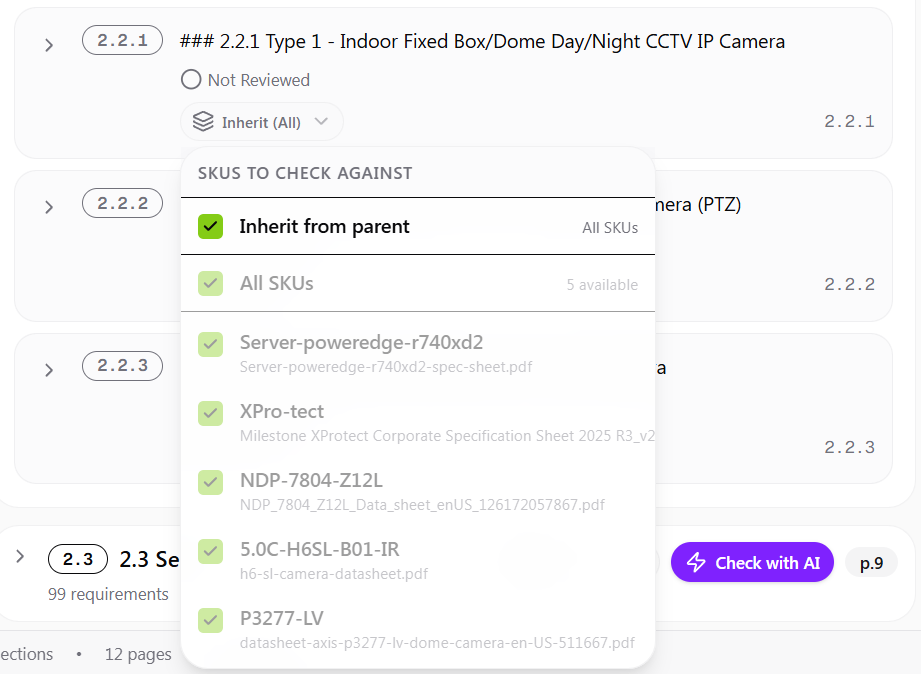
SKU selection dropdown showing inherit from parent, all SKUs, and individual SKU options
By default:
  • The main section is set to All SKUs
  • Child items inherit this setting
You may override this by selecting specific SKUs for a full section, a subsection, or an individual requirement. This gives you fine-grained control over evaluation logic.

SKU inheritance logic

The system uses an inheritance model:
Parent settingChild behavior
All SKUsChildren inherit all SKUs
Specific SKUs selectedChildren inherit those specific SKUs
Override at child levelChild uses its own selection
This structure enables precise control when different requirement groups apply to different product types. For example:
  • Cameras section — evaluate only camera SKUs
  • Server section — evaluate only server SKUs

Selecting multiple SKUs

You may select multiple SKUs for a single section or requirement tree. When multiple SKUs are selected:
  • Compliance is executed against each selected SKU
  • Results are generated per SKU
  • This enables side-by-side comparison of products
This is particularly useful when comparing alternative models.

Performance considerations

Selecting all SKUs for every section may:
  • Increase compliance processing time
  • Produce a larger and more complex Excel export
  • Include unnecessary evaluation results
For best performance and clarity, select only relevant SKUs per section. Avoid leaving all SKUs selected by default unless intentional.

Run the evaluation and review results

Once SKU selection is confirmed:
1

Click Check with AI

Click the Check with AI button at the section or requirement level.

Check with AI button
2

Review compliance results

After processing, click any requirement to expand it and display:
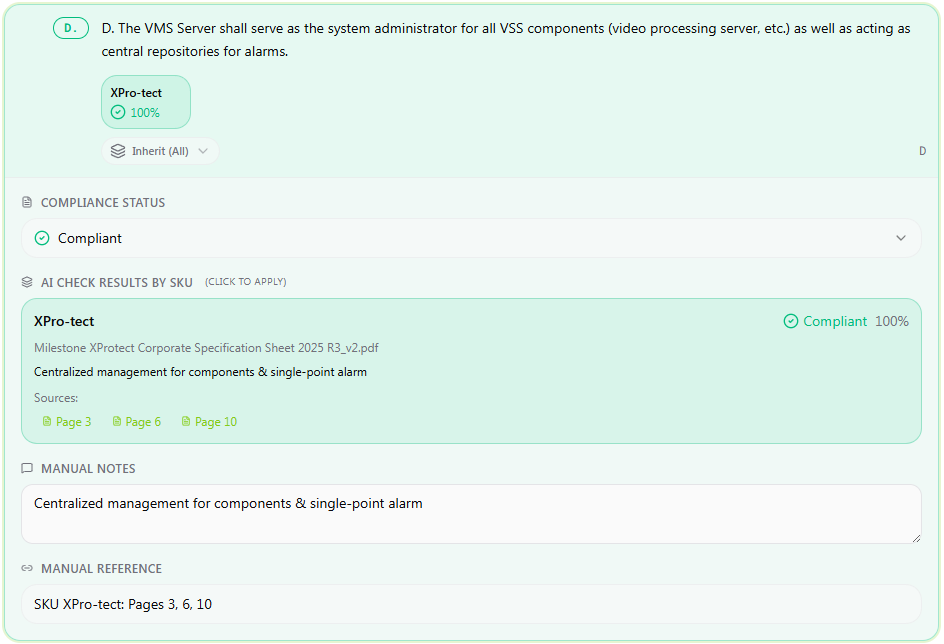
  • Compliance result per selected SKU
  • Confidence score
  • Extracted reasoning
  • Source references with page numbers
Expanded compliance result showing status, AI reasoning, source page references, and manual notes
Each selected SKU is evaluated independently. If multiple SKUs were selected, separate results are displayed for each one.

Evidence and traceability

Each AI result includes:
  • A summarized reasoning statement
  • Direct references to source pages within the linked datasheet
  • A confidence percentage
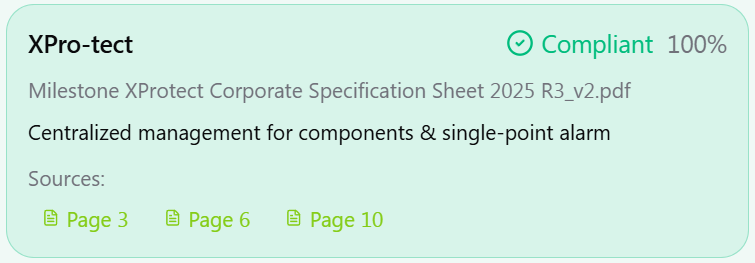
AI result card showing Compliant status at 100% confidence with source page references
Clicking a source page navigates directly to the referenced location in the document. This ensures compliance decisions are evidence-backed and traceable.
The confidence percentage represents the system’s confidence in the evaluation based on the clarity and strength of supporting evidence. It does not represent percentage compliance.
  • A higher confidence score indicates clear alignment between the requirement and datasheet language.
  • A lower confidence score may indicate ambiguity in wording, partial matches, or limited explicit evidence.
Always review the reasoning and referenced sources before applying the compliance status.