> ## Documentation Index
> Fetch the complete documentation index at: https://docs.spexcompl.ai/llms.txt
> Use this file to discover all available pages before exploring further.
# Review extracted requirements
> Verify the structured requirements extracted from the RFP before running compliance.
After creating the project, the system automatically processes the RFP and extracts structured requirements. Before running compliance, review the extracted structure to ensure it reflects the original document correctly.
## Understand the structured view
The RFP Viewer displays extracted requirements in a split layout:
* **Left panel** — extracted requirements organized by parts, sections, subsections, and clauses
* **Right panel** — the original PDF for side-by-side verification
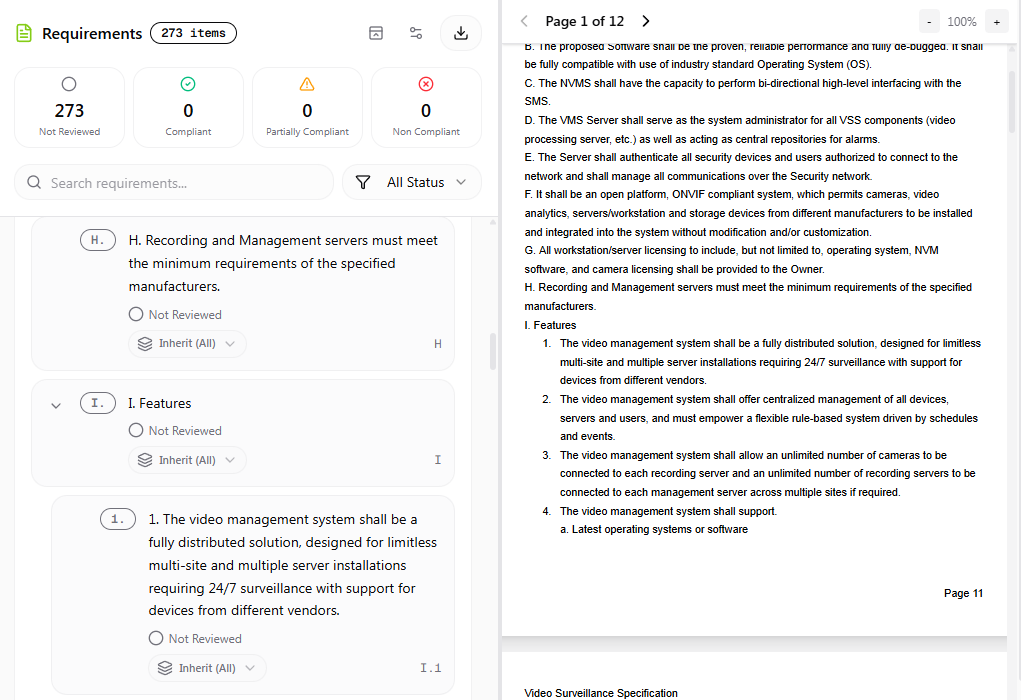 The hierarchy mirrors the original RFP numbering.
You can switch between three view modes:
The hierarchy mirrors the original RFP numbering.
You can switch between three view modes:
 * **Requirements** — structured list only
* **PDF** — original document only
* **Split** — both side by side
## Verify extracted requirements
Confirm that:
* All required sections are present
* Numbering aligns with the original document
The system supports:
* Native text-based PDFs
* Scanned PDFs (OCR processing)
* Structured and semi-structured tables
* Multi-level numbering formats
The extraction engine has been extensively tested across a wide range of real-world RFP documents. However, speXcompl.ai is in Early Access — occasional extraction inconsistencies may occur due to the diversity of formatting styles.
If you notice missing sections, misaligned numbering, or structural inaccuracies, you may proceed with compliance while keeping those observations in mind. Contact support if needed — project refunds are available where appropriate.
## Understand requirement status
At this stage, all items appear as **Not Reviewed**. The compliance summary at the top shows:
* Total extracted items
* Review status breakdown
Do not run compliance yet if Scope is not properly configured. Proceed to [Configure scope](/how-to-guide/configure-scope) first.
* **Requirements** — structured list only
* **PDF** — original document only
* **Split** — both side by side
## Verify extracted requirements
Confirm that:
* All required sections are present
* Numbering aligns with the original document
The system supports:
* Native text-based PDFs
* Scanned PDFs (OCR processing)
* Structured and semi-structured tables
* Multi-level numbering formats
The extraction engine has been extensively tested across a wide range of real-world RFP documents. However, speXcompl.ai is in Early Access — occasional extraction inconsistencies may occur due to the diversity of formatting styles.
If you notice missing sections, misaligned numbering, or structural inaccuracies, you may proceed with compliance while keeping those observations in mind. Contact support if needed — project refunds are available where appropriate.
## Understand requirement status
At this stage, all items appear as **Not Reviewed**. The compliance summary at the top shows:
* Total extracted items
* Review status breakdown
Do not run compliance yet if Scope is not properly configured. Proceed to [Configure scope](/how-to-guide/configure-scope) first.